

Best CPU for gaming in 2026: Our top picks tested and reviewed


Table of Contents
One of the core components of any PC build, finding the right CPU for it is crucial for the best gaming experience. With the power for processing and computing, it works together with the best graphics card to offer an optimal performance and feature set.
With plenty of options on the market, spanning a range of generations and manufacturers, there is certainly some choice to be made. For CPUs, your main choices are either Intel or AMD, and the latter has its range of X3D CPUs that stack the cache, which gives it a boost in gaming, so those are the optimal picks for the job.
Yet there’s still a wide range of scenarios, budgets, and preferences to satisfy. So we’ve picked out and listed a range of options to consider.
Latest tech deals.
- AMD Ryzen™ 9 9900X 12-Core - was $499 now $328
- CORSAIR 4000D PC Case - was $124.99 now $75.99
- Hisense 65" Class E6SR - was $549 now $377.99
- Apple 2026 MacBook Air - was $1,999 now $1,799
- Skytech Gaming PC Desktop (9850X3d) - was $4,299 now $3,799
- Apple Magic Mouse - was $79 now $59
- MSI Prestige 16 Flip - was $2,149 now $1,899
- Kotin 9700X Gaming PC - was $2,399 now $2,199
Prices correct as of October 9th, 2026.
-
Best CPU for gaming
AMD Ryzen 7 9800X3D
- Cores: 8
- Threads: 16
- Boost clock speed: 5.2GHz
- Base clock speed: 4.7GHz
- L3 cache: 96MB
- TDP: 120W


-
Best Intel CPU for gaming
Intel Core Ultra 7 265K
- Cores: 20 (8P/12E)
- Threads: 20
- Boost clock speed: 5.5GHz
- Base clock speed: 3.9GHz P-core/3.3GHz E-core
- L3 cache: 30MB
- TDP: 125W base/250W max
-
Best mid-range CPU for gaming
AMD Ryzen 7 9700X
- Cores: 8
- Threads: 16
- Boost clock speed: 5.5 GHz
- Base clock speed: 3.8 GHz
- L3 Cache: 32 MB
- TDP: 65 W
-
Best Intel budget CPU for gaming
Intel Core Ultra 5 245K
- Cores: 14 (6x P, 8x E)
- Threads: 14
- Boost clock speed: 5.2GHz P-core, 4.6GHz E-core
- Base clock speed: 4.2GHz P-core, 3.6GHz E-core
- L3 cache: 24MB
- TDP: 125W base, 159W max
-
Best budget AMD CPU for gaming
AMD Ryzen 5 9600X
- Cores: 6
- Threads: 12
- Boost clock speed: 5.4 GHz
- Base clock speed: 3.9 GHz
- L3 Cache: 32 MB
- TDP: 65 W


How we picked
To pick out the best CPU for gaming, we’ve considered a wide range of factors and options. Looking over our own CPU reviews and processor tests, we have firsthand experience with how good they are in use. We also look across the market to see what is out there and what else might be a good option.
With years of experience, we know what to look out for and what makes a CPU a good choice for gaming. We also keep up-to-date with the latest news, and check over other reviews and more to ensure we can recommend the best options.
Best CPU for gaming


- Cores: 8
- Threads: 16
- Boost clock speed: 5.2GHz
- Base clock speed: 4.7GHz
- L3 cache: 96MB
- TDP: 120W
- Platform: AM5
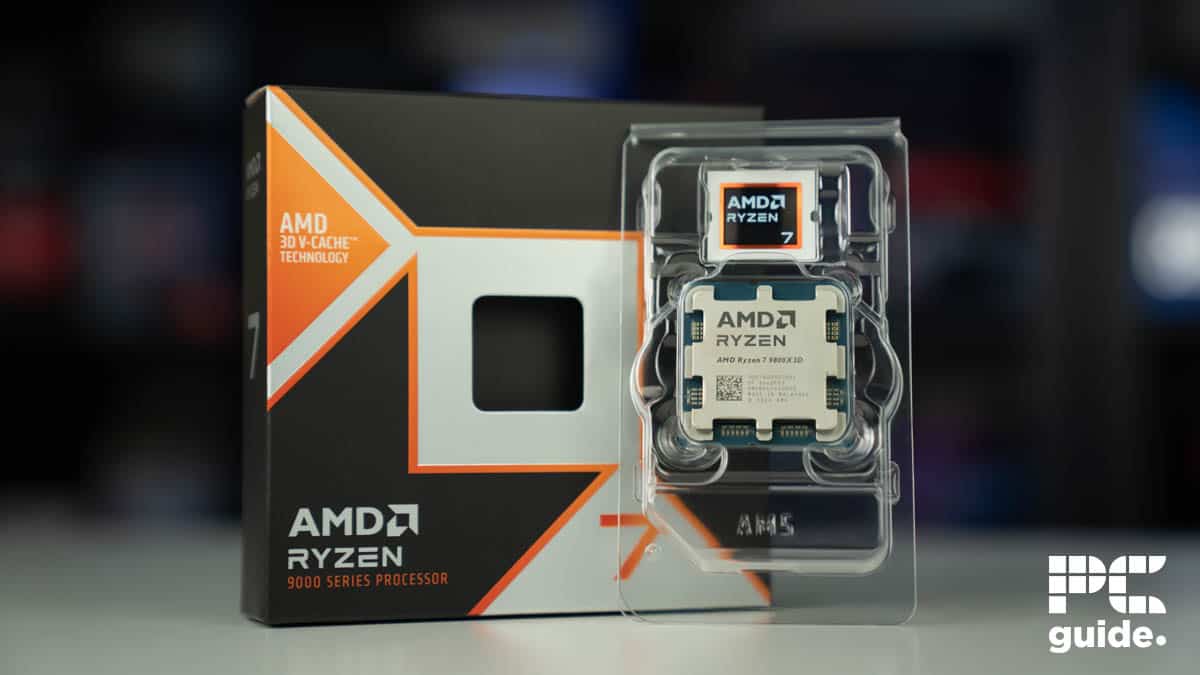
The AMD Ryzen 7 9800X3D is the top contender for the best gaming CPU due to its massive L3 cache enabled by 3D V-Cache technology. This large cache provides a significant performance boost in games by storing frequently accessed data for quicker retrieval.
In our 9800X3D review, the processor delivered a best-in-class performance in all games we tested, completely beating the previous king of gaming, the 7800X3D, and even outperforming flagships like the Core Ultra 9 285K and Ryzen 9950X. For example, in CS2, we were constantly getting over 600 FPS at 1080p. For reference, the 7800X3D and 9700X were all the way back in the mid-300s. Even in Cyberpunk 2077, the 9800X3D offered the most framerates at 334 FPS.
Along with that, the 9800X3D can also be overclocked. When we enabled PBO, we saw a good boost in both gaming and productivity benchmarks. Speaking of which, AMD’s architectural changes with the 9800X3D, including using a 4nm process node, have finally given it a good bump in synthetic tests, as the CPU showed good results in single-core benchmarks.
Overall, you can’t deny the numbers, and it is very clear that there is simply no other CPU that can beat the Ryzen 7 9800X3D in gaming. As such, if you want the most framerates, this is a no-brainer choice. Just make sure you pair it with the best motherboard and the best cooler for a smooth experience.


Ryzen 7 9800X3D Blender temperatures graph, Image by PC Guide

Ryzen 7 9800X3D CS2 Power graph, Image by PC Guide

Ryzen 7 9800X3D Cyberpunk 2077 FPS graph, Image by PC Guide

Ryzen 7 9800X3D Blender scores graph, Image by PC Guide

Ryzen 7 9800X3D CS2 temperatures graph, Image by PC Guide

Ryzen 7 9800X3D Blender power graph, Image by PC Guide

Ryzen 7 9800X3D multi core synthetics graph, Image by PC Guide

Ryzen 7 9800X3D CS2 FPS graph, Image by PC Guide
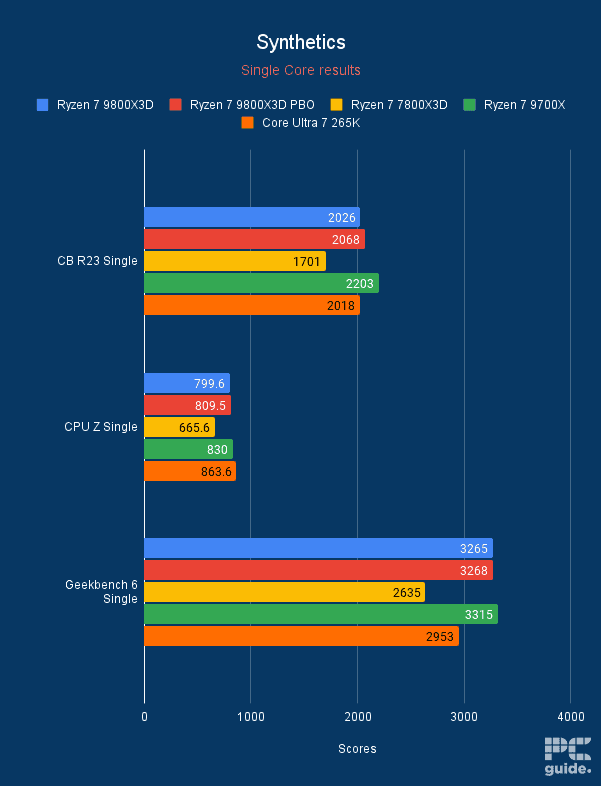
Ryzen 7 9800X3D synthetics single core graph, Image by PC Guide

Ryzen 7 9800X3D Cyberpunk 2077 power graph, Image by PC Guide

Ryzen 7 9800X3D Cyberpunk 2077 temperatures graph, Image by PC Guide


- Cores: 20 (8P/12E)
- Threads: 20
- Boost clock speed: 5.5GHz
- Base clock speed: 3.9GHz P-core/3.3GHz E-core
- L3 cache: 30MB
- TDP: 125W base/250W max
- Platform: LGA 1851 (Arrow Lake)
Now, if you’re more keen on getting an Intel CPU, then the option we’d recommend is the Core Ultra 265K. Sitting in the middle ground of the Arrow Lake release, it does offer a stronger value to performance out of range. Especially with it offering the cores and threads that are plenty enough for most gamers.
It does come with 20 of both cores and threads, the former of which are split across 8 performance and 12 efficient cores. With a boost clock capable of reaching 5.5GHz, the Intel processor has an L3 cache of 30MB in comparison to AMD’s selection.
It all comes at a TDP of 125W, with a boost potentially reaching 250W. Providing a good option for the LGA 1851 platform, it is a good gaming processor and should come with upgrades down the line, depending on Intel’s plans.
In our review of the processor, it does well in the range of synthetic and gaming tests. In synthetics, it scores 2,036 in Cinebench single-core and 21,730 in multicore benchmarks. With Cyberpunk on low, the game achieved a framerate of 191fps when paired with an RTX 4070 Ti.

Intel Core Ultra 7 265K in Cyberpunk 2077

single-core-test-265K

max-temps-265K-2

cyberpunk-2077-tests-265K

synthetic-multi-core-265K

blender-benchmarks-265K


- Cores: 8
- Threads: 16
- Boost clock speed: 5.5 GHz
- Base clock speed: 3.8 GHz
- L3 Cache: 32 MB
- TDP: 65 W
- Platform: AMD Socket AM5
Another option from AMD is the mid-range Ryzen 7 9700X. Cutting down the price but keeping up the specs with its 8 cores and 16 threads. Plus, it has a lower TDP of just 65W on the base level, so it can even cut down on the power requirements of your system, ending up using less power overall.
Those cores do end up running up to a speed of 5.5 GHz with a base clock of 3.8 GHz. As a non-X3D processor, the L3 cache is just 32 MB, but it still offers great performance for it. Particularly if you want it for gaming or other tasks, it does get the job done.
Something we thoroughly tested and found out in the 9700X review. You can see the results of those benchmarks below, so you can get an idea of what it is capable of.
| Benchmark | 9700X Score | 7700X Score |
|---|---|---|
| CPU Z Single | 856 points | 772 points |
| CPU Z Multi | 8,199 points | 7,983 points |
| Cinebench R23 Single | 2,207 points | 1,995 points |
| Cinebench R23 Multi | 20,184 points | 19,650 points |
| Geekbench Single | 3,376 points | 3,043 points |
| Geekbench Multi | 17,290 points | 15,989 points |
| Puget Systems Photoshop | N/A | 9,033 points |
| Blender render | Monster 128.15 SPM Junkshop 93.95 SPM Classroom 64.54 SPM | Monster 126.01 SPM Junkshop 87.84 SPM Classroom 65.30 SPM |
| 7 Zip Compression 32MB (10 passes) | 44.54s | 44.657s |
| Handbrake TOS 4K Fast 1080P encode | Average Speed 86.2 FPS Encode Time 3:26 | Average Speed 87.37 FPS Encode Time 3:26 |
| Game | 9700X | 7700X | 5800X3D |
|---|---|---|---|
| Cyberpunk 2077 | 325 FPS 1% 237 FPS | 296 FPS 1% 132 FPS | 279 FPS 1% 157 FPS |
| Day’s Gone | 240 FPS 1% 130 FPS | 255 FPS 1% 84 FPS | 283 FPS 1% 144 FPS |


- Cores: 14 (6x P, 8x E)
- Threads: 14
- Boost clock speed: 5.2GHz P-core, 4.6GHz E-core
- Base clock speed: 4.2GHz P-core, 3.6GHz E-core
- L3 cache: 24MB
- TDP: 125W base, 159W max
- Platform: LGA 1851 (Arrow Lake)
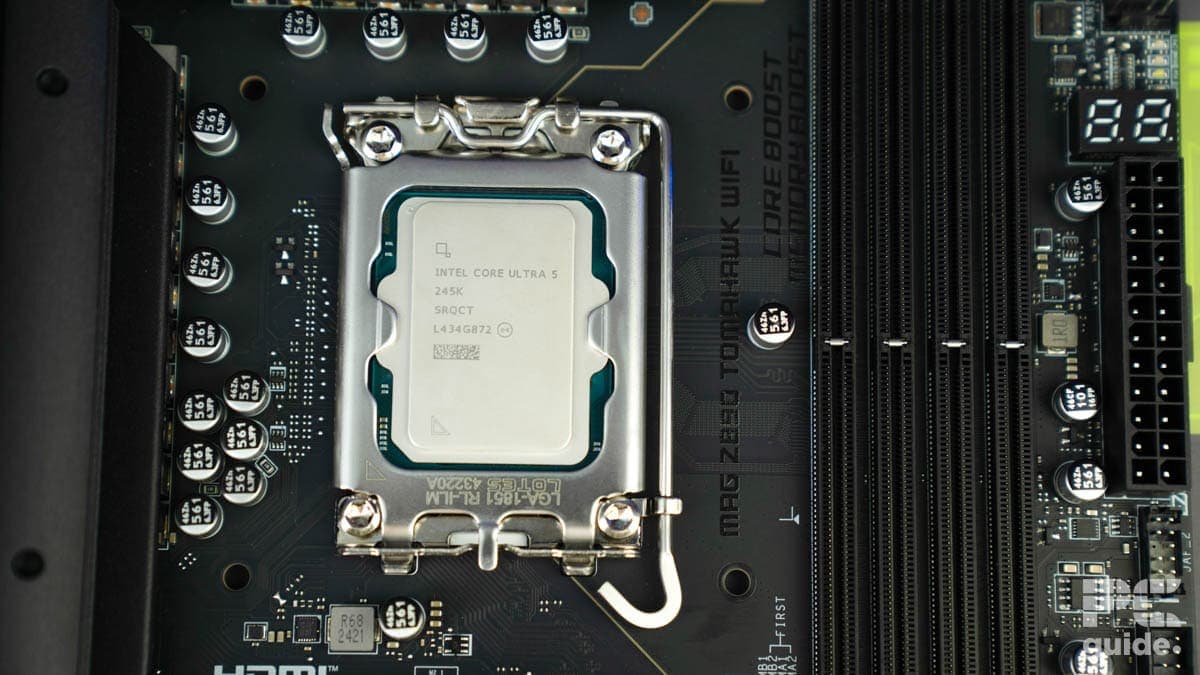
Now, if you want to look for something more on a budget, then the Intel Core Ultra 5 245K is the option for you if you want something from Team Blue. Also made for the LGA 1851 platform, it is an entry-level product for it, in case you want to have something to start with and put money towards other parts.
This comes with just 14 cores and threads, split across six performance and eight efficient ones. Running up boost clocks of up to 5.2 or 4.6 GHz. Along with 24MB of L3 cache and a TDP of 125W, it boosts up to 159W too.
In our review of the processor, it does still provide a strong option in synthetics and gaming. Even outperforming the competition and improving over its older generation. So it’s still a viable option even for the price it goes for.

Intel Core Ultra 5 245K single core synthetics, Image by PC Guide

Intel Core Ultra 5 245K multi core synthetics, Image by PC Guide

Intel Core Ultra 5 245K Blender, Image by PC Guide

Intel Core Ultra 5 245K Cyberpunk 2077, Image by PC Guide

Intel Core Ultra 5 245K average package power, Image by PC Guide

Intel Core Ultra 5 245K temperatures, Image by PC Guide


- Cores: 6
- Threads: 12
- Boost clock speed: 5.4 GHz
- Base clock speed: 3.9 GHz
- L3 Cache: 32 MB
- TDP: 65 W
- Platform: AMD Socket AM5
From AMD’s side of things, if you want to jump onto AM5 for a lower price, the Ryzen 5 9600X is the way to go. A popular option that is regularly on sale under $200, with an MSRP of under $280, it has a lot to offer for the value, and getting onto the platform for the future.
Its specs feature 6 cores and 12 threads, with it being able to boost up to 5.4GHz and a base clock of just 3.9GHz. As for the L3 cache, this processor comes with 32MB instead and has a power draw of 65W. Although a later BIOS does increase this if you want performance rather than efficiency.
The 9600X review still shows it to be an effective option that comes with improvements over the 7600X. Still faster and more efficient, it is a great budget pick for AMD.
| Benchmark | 9600X Score | 7600X Score |
|---|---|---|
| CPU Z Single | 827 points | 766 points |
| CPU Z Multi | 6,435 points | 6,192 points |
| Cinebench R23 Single | 2,149 points | 1,923 points |
| Cinebench R23 Multi | 16,315 points | 13,729 points |
| Geekbench Single | 3,283 points | 2,955 points |
| Geekbench Multi | 14,909 points | 13,236 points |
| Puget Systems photoshop | N/A | 8,131 points |
| Blender render | Monster 99.88 SPM Junkshop 72.74 SPM Classroom 50.71SPM | Monster 87.03 SPM Junkshop 62.23 SPM Classroom 45.64 SPM |
| 7 Zip Compression 32MB (10 passes) | 43.42s | 45.531s |
| Handbrake TOS 4K Fast 1080P encode | Average Speed 69.95FPS Encode Time 04:13 | Average Speed 61.49 FPS Encode Time 4:49 |
| Game | 9600X | 7600X | 5800X3D |
|---|---|---|---|
| Cyberpunk 2077 | 325 FPS 1% 208 FPS | 295 FPS 1% 149 FPS | 279 FPS 1% 157 FPS |
| Day’s Gone | 246 FPS 1% 140 FPS | 236 FPS 1% 62 FPS | 283 FPS 1% 144 FPS |
How to pick the best CPU for games
Here are a few factors you should consider before making a final purchase.
Price
When buying a CPU for your desktop PC, you should consider the asking price and the performance offered. Typically speaking, if you’re someone who wants to push games to their limit, then a Core Ultra 7 / Ryzen 7 would be a smarter choice than the weaker alternatives.
Or if you want the absolute no-limits selection, the flagships are there for the taking. As the Core Ultra 9 or Ryzen 9 processors have everything the platforms have to offer at quite a cost, though.
Clock speeds
Clock speeds are also important, so if you want to overclock, shop for processors pushing the 5.0 GHz rate. What’s more, TDP is an essential consideration as well, as Intel currently goes up to 125W, and AMD’s upcoming line will have a power draw of up to 170W base TDP.

Socket type and motherboards
Then there’s the socket type and corresponding motherboards. With a couple of generations and socket changes, there are many to choose from. But the latest ones are LGA 1851 for Intel and LGA 1718/AM5 for AMD, so those are the ones you want to be looking for.
These also limit your compatibility with what processors can be used in each, so be sure to check what combination you want to consider. The motherboards vary too, with different chipsets bringing various speeds, features, and more, so those have to be considered too. Such as on AM5, the variance of tiers from X870E down to B850 offers differences that can influence your decision.
What is the best CPU for gaming?
Both Intel and AMD offer great processors for gaming. Typically, Intel CPUs are the better choice if you want a processor that can handle intense gaming alongside creative work. On the other hand, AMD is known to be perfect for gamers. They are powerful processors that can handle most of your gaming needs.
Particularly, the X3D range of CPUs has given AMD a huge advantage in gaming. Giving them the ability to work more effectively and achieve higher framerates for their cost, they are the go-to option these days.

Is Ryzen 7 overkill for gaming?
No, the Ryzen 7 is not overkill for gaming. These days, with the harder-to-run games and multitasking you might want to do on your PC, a Ryzen 7 is, in fact, the preferred option most of the time. Offering up more cores and threads, but without being the flagship, Ryzen 7s are a great middle ground to go for between work and games.
Is the Ryzen 7 9800X3D good for gaming?
Yes, the 9800X3D is an excellent option for gaming and the top choice for us in the list. Combining great value for the stacked 3D cache, it excels in tasks and goes beyond what the processor can do. It makes it the top option with the value it provides for gaming.
What is the fastest CPU for gaming?
Beyond the 9800X3D, AMD has even more processors in the stack. There is, in fact, the 9950X3D, which offers up the stacked cache but with the base specs of the flagship Ryzen 9. That gives you no-compromise gaming with the whole power of the Zen 5 generation.
About the Author